| Using Stateflow | Search Help Desk |
Using the State Properties Dialog
The State Properties Dialog lets you view and change a state's properties. To display the dialog for a particular state, choose Properties from the state's shortcut menu or click on the state's entry in the Explorer content pane. Stateflow displays the State properties dialog box.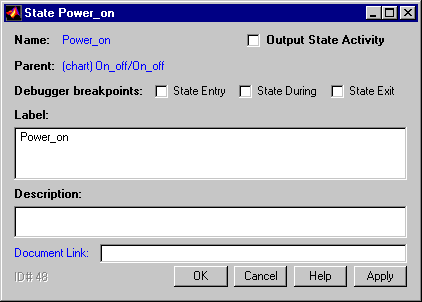
entry, during, or exit actions. See Chapter 10, "Debugging" for more information.
Label.
The state's label. See the section titled "Labeling States" for more information.
Description.
Textual description/comment.
Document Link.
Enter a web URL address or a general MATLAB command. Examples are: www.mathworks.com, mailto:email_address, edit/spec/data/speed.txt.
Click on the dialog Apply button to save the changes. Click on the Revert button to cancel any changes and return to the previous settings. Click on the Close button to save the changes and close the dialog box. Click on the Help button to display the Stateflow online help in an HTML browser window.