| Using Simulink | Search Help Desk |
| Trigonometric Function |
Perform a trigonometric function.
Library
MathDescription
sin, cos, tan, asin, acos, atan, atan2, sinh, cosh, and tanh. The block output is the result of the function operating on the input or inputs.
The name of the function appears on the block icon. Simulink automatically draws the appropriate number of input ports. The block accepts and outputs real or complex signals of type double.
Use the Trigonometric Function block instead of the Fcn block when you want vectorized output because the Fcn block can produce only scalar output.
Data Type Support
A Trigonometric Function block accepts and outputs real or complex signals of typedouble.
Parameters and Dialog Box
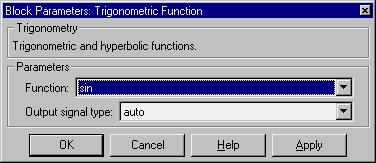
Characteristics
| Direct Feedthrough |
Yes |
| Sample Time |
Inherited from driving block |
| Scalar Expansion |
Of the input when the function requires two inputs |
| Vectorized |
Yes |
| Zero Crossing |
No |