Apply a MATLAB function or expression to the input.
Library
Functions & Tables
Description
The MATLAB Fcn block applies the specified MATLAB function or expression to the input. The specified function or expression is applied to the input. The output of the function must match the output width of the block or an error occurs.
Here are some sample valid expressions for this block:
sin
atan2(u(1), u(2))
u(1)^u(2)
Note
This block is slower than the Fcn block because it calls the MATLAB parser during each integration step. Consider using built-in blocks (such as the Fcn block or the Math Function block) instead, or writing the function as an M-file or MEX-file S-function, then accessing it using the S-Function block.
Data Type Support
A MATLAB Fcn block accepts one complex- or real-valued input of type double and generates real or complex output of type double, depending on the setting of the Output signal type parameter.
Parameters and Dialog Box
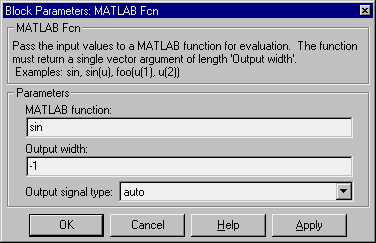
- MATLAB function
- The function or expression. If you specify a function only, it is not necessary to include the input argument in parentheses.
- Output width
- The output width. If the output width is to be the same as the input width, specify
-1. Otherwise, you must specify the correct width or an error will result.
- Output signal type
- The dialog allows you to select the output signal type of the MATLAB Fcn as real, complex, or auto. A value of auto sets the block's output type to be the same as the type of the input signal. If the block has no input signal, auto sets the output type to the port type to which the output is connected.
Characteristics
Direct Feedthrough
|
Yes
|
Sample Time
|
Inherited from driving block
|
Scalar Expansion
|
N/A
|
Vectorized
|
Yes
|
Zero Crossing
|
No
|
[ Previous | Help Desk | Next ]