Represents any block selected from a user-specified library of blocks.
Library
Signals & Systems
Description
A Configurable Subsystem block can represent any block contained in a specified library of blocks. The Configurable Subsystem's dialog box lets you specify which block it represents and the values of the parameters of the represented block.
Configurable Subsystem blocks simplify creation of models that represent families of designs. For example, suppose that you want to model an automobile that offers a choice of engines. To model such a design, you would first create a library of models of the engine types available with the car. You would then use a Configurable Subsystem block in your car model to represent the choice of engines. To model a particular variant of the basic car design, a user need only choose the engine type, using the configurable engine block's dialog.
A Configurable Subystem block's appearance changes depending on which block it represents. Initially, a Configurable Subystem block represents nothing. In this state, it has no ports and displays the icon shown at the left of this paragraph. When you select a library and block, the Configurable Subystem shows the icon and a set of input and output ports corresponding to input and output ports in the selected library.
Simulink uses the following rules to map library ports to Configurable Subystem block ports:
This mapping allows a user to change the library block represented by a Configurable Subsystem block without having to rewire connections to the Configurable Subsystem block.
For example, suppose that a library contains two blocks A and B and that block A has input ports labeled a, b, and c and an output port labeled d and that block B has input ports labeled a and b and an output port labeled e. A Configurable Subsystem block based onthis library would have three input ports labeled a, b, and c, respectively, and two output ports labeled d and e, respectively, as illustrated in the following figure.
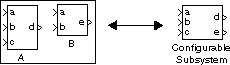
In this example, port a on the Configurable Subystem block connects to port a of the selected library block no matter which block is selected. On the other hand, port c on the Configurable Subsystem block functions only if library block A is selected. Otherwise, it simply terminates.
Note
A Configurable Subsystem block does not provide ports that correspond to non-I/O ports, such as the trigger and enable ports on triggered and enabled subsystems. Thus, you cannot use a Configurable Subsystem block directly to represent blocks that have such ports. You can do so indirectly, however, by wrapping such blocks in subsystem blocks that have input or output ports connected to the non-I/O ports.
Data Type Support
A Configurable Subsystem block accepts and outputs signals of the same types as are accepted or output by the block that it currently represents.
Parameters and Dialog Box
A Configurable Subsystem's dialog box changes, depending on whether the Configurable Subystem currently represents a library and which block, if any, the Configurable Subsystem represents. Initially a Configurable Subsystem does not represent anything; its dialog box displays only an empty Library name parameter.
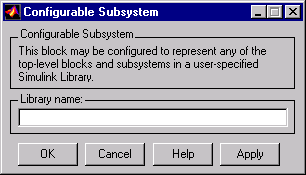
- Library name
- The relative path name of the library of blocks that this Configurable Subsystem can represent, for example, simulink/Math.
To specify the library that you want the Configurable Subystem to represent, enter the library's name in the Library name field.
Note
You cannot use the block dialog box to change the library represented by an existing Configurable Subsystem block. You can, however, change the library by setting the block's Library parameter to the name of the new library, using the set_param model creation command.
Note
If you add or remove blocks or ports in a library, you must recreate any Configurable Subsystem blocks that use the library.
When you specify the library, a new set of parameters replaces the Library name field. The new set comprises a Block choice field, an Open subystems when selected field, and the parameters, if any, of the block currently represented by the Configurable Subsystem. The following figure shows the dialog box for a Configurable Subystem block that represents the Simulink Discrete block library.
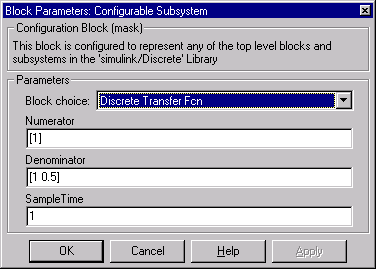
- Block choice
- The block that this Configurable Subystem block current represents.
- Open subsystems when selected
- Checking this option causes Simulink to open a nonmasked block when you select it. This parameter appears only when the selected block is a masked block.
Note
The other parameter fields in the dialog shown above are those of the Discrete Transfer Function block, which the Configurable Subsystem block represents in this example.
Characteristics
A Configurable Subsystem block has the characteristics of the block that it currently represents.
[ Previous | Help Desk | Next ]