Display and provide the simulation time.
Library
Sources
Description
The Clock block outputs the current simulation time at each simulation step. This block is useful for other blocks that need the simulation time.
When you need the current time within a discrete system, use the Digital Clock block.
Data Type Support
A Clock block outputs a real-valued signal of type double.
Parameters and Dialog Box
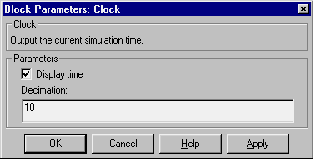
- Display time
- Use the Display time check box to display the current simulation time inside the Clock block icon, which will then have the following appearance.
- Decimation
- The Decimation parameter value is the increment at which the clock gets updated; it can be any positive integer. For example, if the decimation is 1000, then for a fixed integration step of 1 millisecond, the clock will update at 1 second, 2 seconds, and so on.
Characteristics
Sample Time
|
Continuous
|
Scalar Expansion
|
N/A
|
Vectorized
|
No
|
Zero Crossing
|
No
|
[ Previous | Help Desk | Next ]