| Using Simulink | Search Help Desk |
Starting the Debugger
Use thesldebug command or the debug option of the sim command to start a model under debugger control. (See sim for information on specifying sim options.)
For example, either the command
sim('vdp',[0,10],simset('debug','on'))
or the command
sldebug 'vdp'loads the Simulink demo model,
vdp, into memory and pauses at the first block in the first time step. The debugger highlights the model's initial block and associated output signal lines in the model diagram. The next figure shows the vdp block diagram as it appears on debug mode start-up.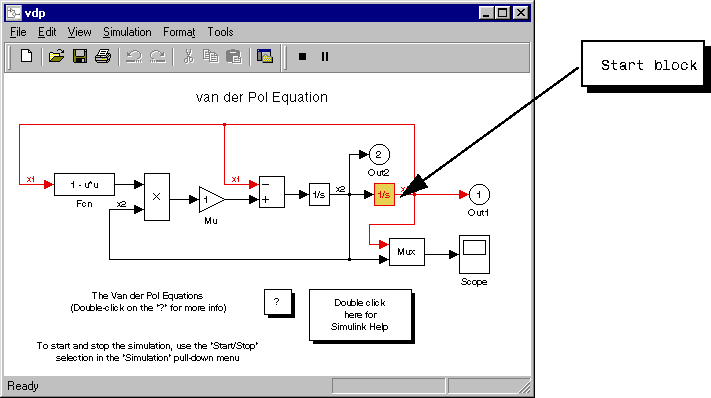
[Tm=0                      ] **Start** of system 'vdp' outputs
(sldebug @0:0 'vdp/Integrator1'): step
At this point, you can get help, run the simulation step-by-step, examine data, or perform other debugging tasks by entering debugger and other MATLAB commands at the debug prompt. The following sections explain how to use the debugger commands.