Using Simulink     Search    Help Desk 

Sample Time Colors

Simulink identifies different sample rates in a model using the sample time color feature, which shows sample rates by applying the color scheme shown in this table.

Table 9-2: Sample Time Colors 
Color
Use
Black
Continuous blocks
Magenta
Constant blocks
Yellow
Hybrid (subsystems grouping blocks, or Mux or Demux blocks grouping signals with varying sample times)
Red
Fastest discrete sample time
Green
Second fastest discrete sample time
Blue
Third fastest discrete sample time
Light Blue
Fourth fastest discrete sample time
Dark Green
Fifth fastest discrete sample time
Cyan
Triggered sample time
Gray
Fixed in minor step

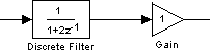
To understand how this feature works, it is important to be familiar with Simulink's Sample Time Propagation Engine (STPE). The figure below illustrates a Discrete Filter block with a sample time of Ts driving a Gain block. Because the Gain block's output is simply the input multiplied by a constant, its output changes at the same rate as the filter. In other words, the Gain block has an effective sample rate equal to that of the filter's sample rate. This is the fundamental mechanism behind the STPE.

To enable the sample time colors feature, select Sample Time Colors from the Format menu.

Simulink does not automatically recolor the model with each change you make to it, so you must select Update Diagram from the Edit menu to explicitly update the model coloration. To return to your original coloring, disable sample time coloration by again choosing Sample Time Colors.

When using sample time colors, the color assigned to each block depends on its sample time with respect to other sample times in the model.

Simulink sets sample times for individual blocks according to these rules:

It is important to note that Mux and Demux blocks are simply grouping operators - signals passing through them retain their timing information. For this reason, the lines emanating from a Demux block may have different colors if they are driven by sources having different sample times. In this case, the Mux and Demux blocks are color coded as hybrids (yellow) to indicate that they handle signals with multiple rates.

Similarly, Subsystem blocks that contain blocks with differing sample times are also colored as hybrids, because there is no single rate associated with them. If all of the blocks within a subsystem run at a single rate, then the Subsystem block is colored according to that rate.

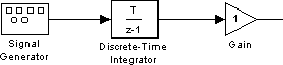
Under some circumstances, Simulink also backpropagates sample times to source blocks if it can do so without affecting the output of a simulation. For instance, in the model below, Simulink recognizes that the Signal Generator block is driving a Discrete-Time Integrator block so it assigns the Signal Generator block and the Gain block the same sample time as the Discrete-Time Integrator block.


You can verify this by enabling Sample Time Colors and noting that all blocks are colored red. Because the Discrete-Time Integrator block only looks at its input at its sample times, this change does not affect the outcome of the simulation but does result in a performance improvement.

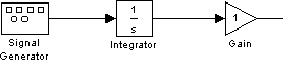
Replacing the Discrete-Time Integrator block with a continuous Integrator block, as shown below, and recoloring the model by choosing Update Diagram from the Edit menu cause the Signal Generator and Gain blocks to change to continuous blocks, as indicated by their being colored black.


[ Previous | Help Desk | Next ]