| Using Simulink | Search Help Desk |
Selecting One Object
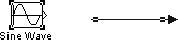
To select an object, click on it. Small black square "handles" appear at the corners of a selected block and near the end points of a selected line. For example, the figure below shows a selected Sine Wave block and a selected line: