| Using Simulink | Search Help Desk |
Scalar Expansion of Inputs and Parameters
Scalar expansion is the conversion of a scalar value into a vector of identical elements. Simulink applies scalar expansion to inputs and/or parameters for most blocks. Block descriptions in Chapter 8 indicate whether Simulink applies scalar expansion to a block's inputs and parameters.Scalar Expansion of Inputs
When using blocks with more than one input port (such as the Sum or Relational Operator block), you can mix vector and scalar inputs. When you do this, the scalar inputs are expanded into vectors of identical elements whose widths are equal to the width of the vector inputs. (If more than one block input is a vector, they must have the same number of elements.) This model adds scalar and vector inputs. The input from block Constant1 is scalar expanded to match the size of the vector input from the Constant block. The input is expanded to the vector[3 3 3].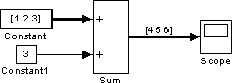
Scalar Expansion of Parameters
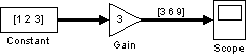
You can specify the parameters for vectorized blocks as either vectors or scalars. When you specify vector parameters, each parameter element is associated with the corresponding element in the input vector(s). When you specify scalar parameters, Simulink applies scalar expansion to convert them automatically into appropriately sized vectors. This example shows that a scalar parameter (the Gain) is expanded to a vector of identically valued elements to match the size of the block input, a three-element vector.