| Using Simulink | Search Help Desk |
Block Properties Dialog Box
The Block Properties dialog box lets you set some common block parameters.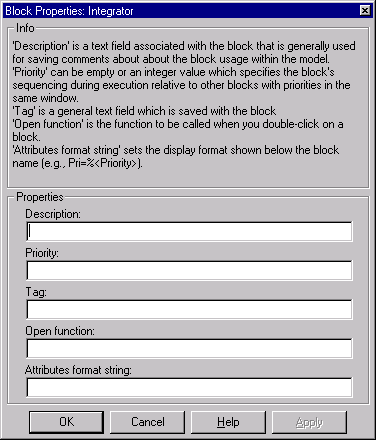
Description
Brief description of the block's purpose.Priority
Execution priority of this block relative to other blocks in the model. See "Assigning Block Priorities" for more information.Tag
A general text field that is saved with the block.Open function
MATLAB (m-) function to be called when a user opens this block.Attributes format string
Current value of the block'sAttributesFormatString parameter. This parameter specifies which parameters to display beneath a block's icon. The attributes format string can be any text string with embedded parameter names. An embedded parameter name is a parameter name preceded by %< and followed by >, for example, %<priority>. Simulink displays the attributes format string beneath the block's icon, replacing each parameter name with the corresponding parameter value. You can use line feed characters (\n) to display each parameter on a separate line. For example, specifying the attributes format string
pri=%<priority>\ngain=%<Gain>

N/S (not supported) for the parameter's value. If the parameter name is invalid, Simulink displays "???".