Chapter 2
Quick Start
Running a Demo Model
An interesting demo program provided with Simulink models the thermodynamics of a house. To run this demo, follow these steps:
- 1
- Start MATLAB. See your MATLAB documentation if you're not sure how to
do this.
- 2
- Run the demo model by typing
thermo in the MATLAB command window.
This command starts up Simulink and creates a model window that contains
this model.
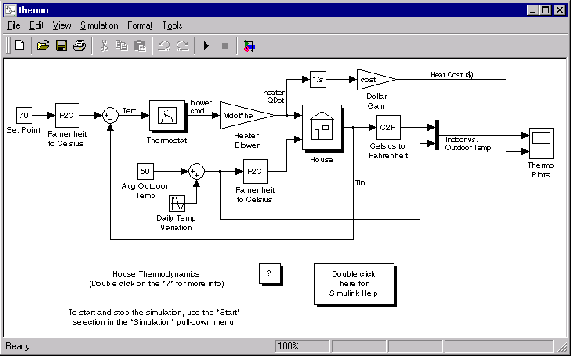
When you open the model, Simulink opens a Scope block containing two plots labeled Indoor vs. Outdoor Temp and Heat Cost ($), respectively.
- 3
- To start the simulation, pull down the Simulation menu and choose the
Start command (or, on Microsoft Windows, press the Start button on the
Simulink toolbar). As the simulation runs, the indoor and outdoor
temperatures appear in the Indoor vs. Outdoor Temp plot and the
cumulative heating cost appears in the Heat Cost ($) plot.
- 4
- To stop the simulation, choose the Stop command from the Simulation
menu (or press the Pause button on the toolbar). If you want to explore other
parts of the model, look over the suggestions in "Some Things to Try" on page
2-4.
- 5
- When you're finished running the simulation, close the model by choosing
Close from the File menu.
[ Previous | Help Desk | Next ]