| Report Generator | Search Help Desk |
Converting a Generated Report Into Another Format
The report generation process always produces an SGML source file and then converts the file to the output format specified in the "Report Format & Stylesheet" section. The SGML source file is<reportname>.sgml.
If you want to convert a report in an SGML source file to one of the other file output formats without regenerating the report, you can use the rptconvert command. The rptconvert command transforms a DocBook SGML source file created by the Report Generator to a formatted document.
Working with the Report Conversion UI
If you typerptconvert without any input arguments, the report conversion UI will appear.
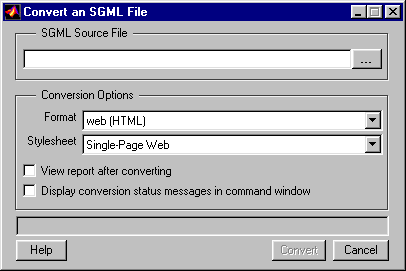
SGML Source File
Enter the name of the SGML source file you want to convert in this text box or use the browse button (...) to find it.Conversion Options
Specify output options in this section. Format. Choose the desired output format. Stylesheet. Choose the desired stylesheet. See "Report Format and Stylesheets" earlier in this chapter for more information about format and stylesheet. View report after converting. Select this option if you want to view the report after the conversion is complete. Display conversion status messages in command window. Select this option if you want to display conversion status messages in the MATLAB command window after report conversion is complete.Converting the Report
Click on the Convert button to convert the report.How Unreadable Image Files Are Handled
If the original document contains an image that your viewer cannot read, (e.g., if you are using an HTML viewer that cannot read EPS files), then a placeholder for the image will appear in your report instead of the actual image. Make sure that the report you are converting has images saved in a format that your viewer can read.Working from the Command Line
You can userptconvert from the command line with varying levels of definition:
rptname=rptconvert(source); source is the name of the DocBook file (with or without the .sgml extension). The default format (HTML) and stylesheet (Single-Page Web) are used.
rptname=rptconvert(source,format); valid format arguments are:
The default stylesheet for the selected option is used.
rptname=rptconvert(source,format,stylesheet); for a discussion of valid stylesheet options for each output format, see "Report Format and Stylesheets". Type rptconvert #STYLESHEETLIST for a list of valid stylesheet arguments.