Component
Block Execution Order
Category
Simulink
Description
The Block Execution Order component creates a list or table of all nonvirtual blocks in the model, showing the order in which they are executed. See Using Simulink for a definition and a list of virtual and nonvirtual blocks.
You must have Real-Time Workshop to use this component. If you do not have Real-Time Workshop, then this component does not insert anything into the report.
Attributes
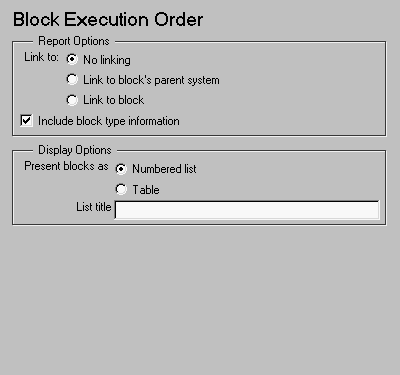
This is the Block Execution Order attribute page.
 Note:
Note:
To view a component attribute page in the Setup File Editor, select the component in the setup file outline on the left and click on the Options tab. If the component is not in the setup file outline, you must add it to the outline first. See Chapter 4 for a discussion on how to add a component to the outline.
Report Options
- Link to:
- This option provides a hyperlink to another block or system in your report.
- If you click on this link, it will take you to the location in the report where the block or system is reported on. If there is no such place in the report, then a hyperlink is not created during the report generation process, even if you choose this option.
- Include block type information
- Select this option if you want to include each block's
BlockType property in the list or table.
Display Options
- Present list as
- Choose Numbered list to create a numbered list.
- Choose Table to create a table.
For example, if you have the following Simulink model or system named Demo_System,
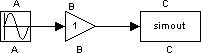
Numbered list creates the following list (note that this list includes block type information, since that option was selected for this example).
1. Demo_System/A (Sin)
2. Demo_System/B (Gain)
3. Demo_System/C (ToWorkspace)
Table creates the following table.
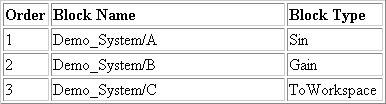 Note that the Include blocktype information option is selected for the examples above.
- List/Table title
- Enter a title in this field if you want to have a title for the table or list. If you have a title for a table, it is included in the List of Tables if the stylesheet you chose in the Report Options attribute page supports it. See "Report Format and Stylesheets" in Chapter 2 to find stylesheets that have a List of Tables.
Insert anything into report?
Yes. List or table.
Filename
cslsortblocklist
[ Previous | Help Desk | Next ]