| Mu Analysis and Synthesis Toolbox | Search Help Desk |
| vinterp, vdcmate | Examples See Also |
Interpolate or decimate VARYING matrices
Syntax
vout = vinterp(vin,stepsize,finaliv,order)
vout = vinterp(vin,varymat,order)
vout = vdcmate(vin,spacing)
Description
In the first form,vinterp produces a regularly spaced interpolated version of the input VARYING matrix. The input arguments areiv = [1:2:6];
disp(iv)
1 3 5
Note that the value of 6 does not appear in the vector.
In the second form, vinterp produces a VARYING matrix vout that is an interpolated version of vin. The independent variables of vout are the same as the independent variables of varymat. The input arguments are:
varymat
VARYING matrix with desired independent variablesorder
type of interpolation (optional, default = 0) 0 zero-order hold 1 linear interpolationvdcmate decimates the VARYING matrix vin, whose independent variable must be linearly spaced and in ascending order. If spacing has a value of n, then the output contains only the matrices corresponding to every nth independent variable of the input. If no spacing is specified, the default is 10.
Examples
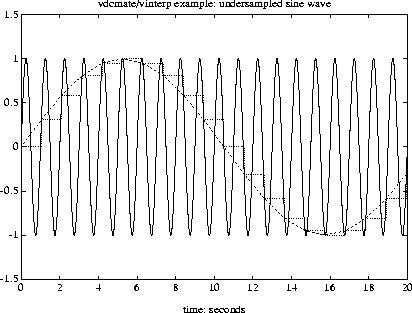
siggen creates a sinewave. This is effectively sampled by vdcmate and then interpolated by vinterp. Note that the default interpolation is a zero-order hold, giving a stair-step output, yi. If a linearly interpolated output were specified, it would look identical to yd since the MATLAB plot command displays a linear interpolation.
timebase = [0:0.005:20];
y = siggen('sin(2*pi*t)',timebase);
minfo(y)
varying:4001 pts1 rows1 cols
yd = vdcmate(y,210);
minfo(yd)
varying:20 pts1 rows1 cols
yi = vinterp(yd,0.005,20,0);
minfo(yi)
varying:4001 pts1 rows1 cols
axis([0,20,-1.5,1.5])
vplot(y,yd,yi)
title('vdcmate/vinterp example: undersampled sine wave')
xlabel('time: seconds')
See Also
dtrsp, sort, sortiv, tackon, trsp