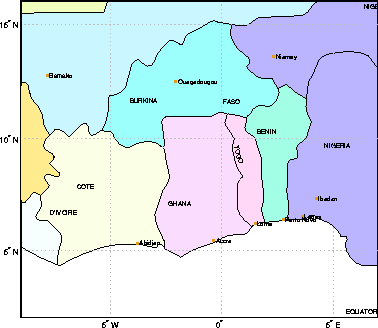
worldmap([2 16],[-9 7],'patch')
| Mapping Toolbox | Search Help Desk |
| worldmap | Examples See Also |
Maps a country or region using the worldlo atlas data
Syntax
worldmap worldmapregionworldmapregiononlyworldmap(region,type) worldmap(latlim,lonlim) worldmap(latlim,lonlim,'type') worldmap(map,maplegend) worldmap(map,maplegend,'type') h = worldmap(...)
Description
worldmap maps a region or country using theworldlo atlas data. The region is selected interactively from a list. The map is created in the current axes.
worldmap region or worldmap(region) makes a map of the specified region. Recognized region strings are 'Africa', 'Antarctica', 'Asia', 'Europe', 'North America', 'North Pole', 'Pacific', 'South America', 'South Pole', 'World' and the names of the countries in the worldlo atlas data. region may also be a padded string matrix or a cell array of strings containing multiple country names.
worldmap regiononly adds only the specified country to the map. For example, worldmap 'italyonly'. If any of the country names in region string matrix or cell array of strings end with 'only', only the requested countries are displayed.
worldmap(region,type) controls the atlas data displayed. Type 'line' or 'patch' creates a map with atlas data of those types. If the size of the map permits, point and text annotation of countries and cities is included. Type 'lineonly' or 'patchonly' suppresses the point and text annotation. Type 'none' suppresses all atlas data. If omitted, type 'line' is assumed.
worldmap(latlim,lonlim) and worldmap(latlim,lonlim,type) use the supplied geographic limits to define the map. The geographic limits are two-element vectors of the form [start end], in angular units of degrees.
worldmap(map,maplegend) and worldmap(map,maplegend,'type') use the supplied regular matrix map to define the geographic limits. The matrix map is displayed using MESHM unless type is 'none', 'lineonly', 'patch' or 'patchonly'. Use type 'meshonly' to display only the matrix map.
h = worldmap(...) returns the handle of the map axes.
Examples
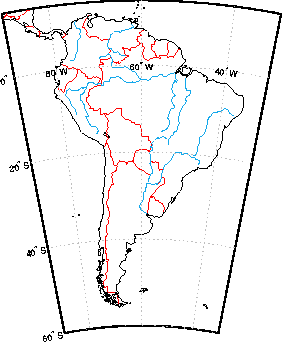
worldmap 'south america'worldmap([2 16],[-9 7],'patch')
Remarks
worldmap uses tightmap set the axis limits tight around the map. If you change the projection or just want more white space around the map frame, use axis auto.
Use hidem(gca) to remove the axes box. set(gca,'Color','w') makes the figure background white.
See Also
usamap |
Creates a map of the United States of America |
gridm |
Toggle and control the display of the map grid |
mlabel |
Meridian labels projected onto a map axes |
plabel |
Parallel labels projected onto a map axes |
framem |
Toggle and control the display of the map frame |
worldlo |
Returns data from the worldlo atlas data file |