| Image Processing Toolbox | Search Help Desk |
| montage | Examples See Also |
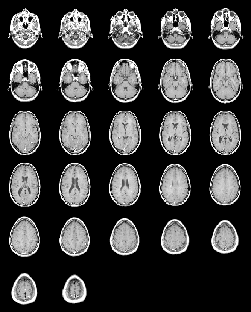
Display multiple image frames as a rectangular montage
Syntax
montage(I)
montage(BW)
montage(X,map)
montage(RGB)
h = montage(...)
Description
montage displays all of the frames of a multiframe image array in a single image object, arranging the frames so that they roughly form a square.
montage(I) displays the k frames of the intensity image array I. I is m-by-n-by-1-by-k.
montage(BW) displays the k frames of the binary image array BW. BW is m-by-n-by-1-by-k.
montage(X,map) displays the k frames of the indexed image array X, using the colormap map for all frames. X is m-by-n-by-1-by-k.
montage(RGB) displays the k frames of the truecolor image array RGB. RGB is m-by-n-by-3-by-k.
h = montage(...) returns the handle to the image object.
Class Support
The input image can be of classuint8, uint16, or double.
Example
load mri
montage(D,map)
See Also
immovie