| Image Processing Toolbox | Search Help Desk |
| imnoise | Examples See Also |
Syntax
J = imnoise(I,type)J = imnoise(I,type,parameters)
Description
J = imnoise(I,type) adds noise of type to the intensity image I. type is a string that can have one of these values:
'gaussian' for Gaussian white noise
'salt & pepper' for "on and off" pixels
'speckle' for multiplicative noise
J = imnoise(I,type,parameters) accepts an algorithm type plus additional modifying parameters particular to the type of algorithm chosen. If you omit these arguments, imnoise uses default values for the parameters. Here are examples of the different noise types and their parameters:
J = imnoise(I,'gaussian',m,v) adds Gaussian white noise of mean m and variance v to the image I. The default is zero mean noise with 0.01 variance.
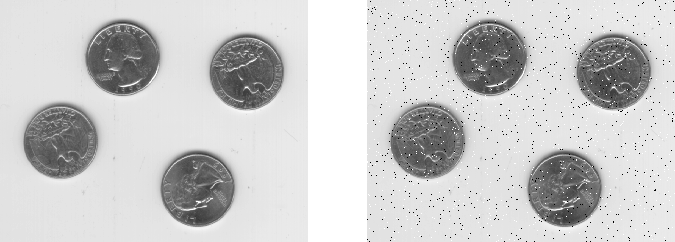
J = imnoise(I,'salt & pepper',d) adds salt and pepper noise to the image I, where d is the noise density. This affects approximately d*prod(size(I)) pixels. The default is 0.05 noise density.
J = imnoise(I,'speckle',v) adds multiplicative noise to the image I, using the equation J = I + n*I, where n is uniformly distributed random noise with mean 0 and variance v. The default for v is 0.04.
Class Support
The input imageI can be of class uint8, uint16, or double. The output image J is of the same class as I.
Example
I = imread('eight.tif');
J = imnoise(I,'salt & pepper',0.02);
imshow(I)
figure, imshow(J)
See Also
rand, randn in the online MATLAB Function Reference