| Image Processing Toolbox | Search Help Desk |
| imadjust | Examples See Also |
Adjust image intensity values or colormap
Syntax
J = imadjust(I,[low high],[bottom top],gamma)
newmap = imadjust(map,[low high],[bottom top],gamma)
RGB2 = imadjust(RGB1,...)
Description
J = imadjust(I,[low high],[bottom top],gamma) transforms the values in the intensity image I to values in J by mapping values between low and high to values between bottom and top. Values below low and above high are clipped; that is, values below low map to bottom, and those above high map to top. You can use an empty matrix ([]) for [low high] or for [bottom top] to specify the default of [0 1]. gamma specifies the shape of the curve describing the relationship between the values in I and J. If gamma is less than 1, the mapping is weighted toward higher (brighter) output values. If gamma is greater than 1, the mapping is weighted toward lower (darker) output values. If you omit the argument, gamma defaults to 1 (linear mapping).
newmap = imadjust(map,[low high],[bottom top],gamma) transforms the colormap associated with an indexed image. If [low high] and [bottom top] are both 2-by-3, and gamma is a 1-by-3 vector, imadjust rescales the red, green, and blue components separately. The rescaled colormap, newmap, is the same size as map.
RGB2 = imadjust(RGB1,...) performs the adjustment on each image plane (red, green, and blue) of the RGB image RGB1. As with the colormap adjustment, you can use different parameter values for each plane by specifying [low high] and [bottom top] as 2-by-3 matrices, and gamma as a 1-by-3 vector.
Class Support
For syntax that include an input image (rather than a colormap), the image can be of classuint8, uint16, or double. The output image is of the same class as the input image. For syntax that include a colormap, the input and output colormaps are of class double.
Remarks
Iftop < bottom, the output image is reversed (i.e., as in a negative).
Example
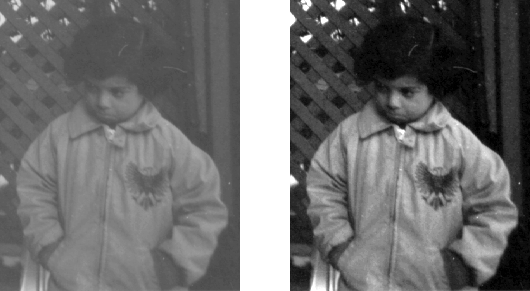
I = imread('pout.tif');
J = imadjust(I,[0.3 0.7],[]);
imshow(I)
figure, imshow(J)
See Also
brighten, histeq