| Image Processing Toolbox | Search Help Desk |
| dilate | Examples See Also |
Perform dilation on a binary image
Syntax
BW2 = dilate(BW1,SE)
BW2 = dilate(BW1,SE,alg)
BW2 = dilate(BW1,SE,...,n)
Description
BW2 = dilate(BW1,SE) performs dilation on the binary image BW1, using the binary structuring element SE. SE is a matrix containing only 1's and 0's.
BW2 = dilate(BW1,SE,alg) performs dilation using the specified algorithm. alg is a string that can have one of these values:
'spatial' (default) - processes the image in the spatial domain.
'frequency' - processes the image in the frequency domain.
BW2 = dilate(BW1,SE,...,n) performs the dilation operation n times.
Class Support
The input imageBW1 can be of class double or uint8. The output image BW2 is of class uint8.
Remarks
You should use the frequency algorithm only if you have a large amount of memory on your system. If you use this algorithm with insufficient memory, it may actually be slower than the spatial algorithm, due to virtual memory paging. If the frequency algorithm slows down your system excessively, or if you receive "out of memory" messages, use the spatial algorithm instead.Example
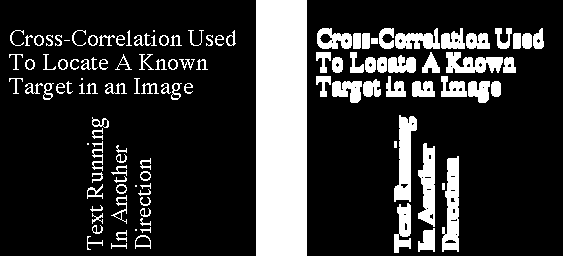
BW1 = imread('text.tif');
SE = ones(6,2);
BW2 = dilate(BW1,SE);
imshow(BW1)
figure, imshow(BW2)
See Also
bwmorph, erode
References
Haralick, Robert M., and Linda G. Shapiro. Computer and Robot Vision, Volume I. Addison-Wesley, 1992. p. 158. Gonzalez, Rafael C., and Richard E. Woods. Digital Image Processing. Addison-Wesley, 1992. p. 518.