Fixed-Point Blockset
  Go to block:
    Search    Help Desk 
FixPt Sum

The FixPt Sum block is a masked S-function that performs addition or subtraction on its inputs.

The operations are specified with the Enter +- characters or the number of inputs parameter. The plus-minus characters indicate the operations to be performed on the inputs:

For a description of all other parameters, refer to "Block Parameters".

The block icon indicates which operations are performed on the inputs. For a description of how the block icon displays the output data type, refer to "Block Icon Display".

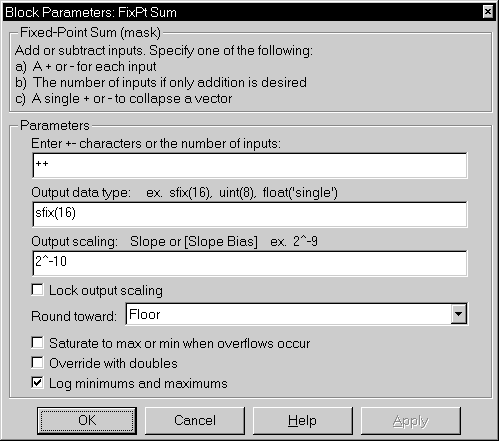
Parameters and Dialog Box

Enter +- characters or the number of inputs
Enter as many plus or minus characters as there are inputs. For addition only, you can enter the number of inputs since this is the default operation.
Output data type
Any data type supported by the Fixed-Point Blockset.
Output scaling
Radix point-only or slope/bias scaling. These scaling modes are only available for generalized fixed-point data types.
Lock output scaling
If checked, Output scaling is locked. This feature is only available for generalized fixed-point output.
Round toward
Rounding mode for the fixed-point output.
Saturate to max or min when overflows occur
If checked, fixed-point overflows saturate. Otherwise, they wrap.
Override with doubles
If checked, the Output data type is overridden with doubles.
Log minimums and maximums
If checked, minimum and maximum simulation values are logged to the workspace.

Operations

The FixPt Sum block first converts the input data type(s) to the output data type using the specified rounding and overflow modes, and then performs the specified operations. Refer to "Rules for Arithmetic Operations" in the manual for more information about the rules this block adheres to when performing operations.

Characteristics

Input Ports
Any data type supported by the blockset
Output Port
Any data type supported by the blockset
Direct Feedthrough
Yes
Sample Time
Inherited
Scalar Expansion
Yes
States
0
Vectorized
Yes


[ Previous | Help Desk | Next ]