The
FixPt Look-Up Table block is a masked S-function that computes an approximation
to some function y=f(x) given x, y data vectors.
The look-up method can use interpolation, extrapolation, or the original
values of the input. The length of the x and y data vectors
provided to this block must match. Also, the x data vector must
be strictly monotonically increasing after conversion to the input's fixed-point
data type. Note that due to quantization, the x data vector may
be strictly monotonic in doubles format, but not so after conversion to
a fixed-point data type.
To map two inputs to an output, see FixPt
Look-Up Table (2D).
You define the table by specifying the Vector
of input values parameter as a 1 × n vector and the Vector
of output values parameter as a 1 × n vector. The
block generates output based on the input values using one of these methods
selected from the Method parameter list:
-
Interpolation-Extrapolation -- This
is the default method; it performs linear interpolation and extrapolation
of the inputs.
-
If a value matches the block's input, the output is the corresponding element
in the output vector.
-
If no value matches the block's input, then the block performs linear interpolation
between the two appropriate elements of the table to determine an output
value. If the block input is less than the first or greater than the last
input vector element, then the block extrapolates using the first two or
last two points.
-
Interpolation-Use End Values -- This
method performs linear interpolation as described above but does not extrapolate
outside the end points of the input vector. Instead, the end-point values
are used.
-
Use Input Nearest -- This method does
not interpolate or extrapolate. Instead, the element in x nearest
the current input is found. The corresponding element in y is
then used as the output.
-
Use Input Below -- This method does not interpolate or extrapolate.
Instead, the element in x nearest and below the current input
is found. The corresponding element in y is then used as the output.
If there is no element in x below the current input, then the
nearest element is found.
-
Use Input Above -- This method does not interpolate or extrapolate.
Instead, the element in x nearest and above the current input
is found. The corresponding element in y is then used as the output.
If there is no element in x above the current input, then the
nearest element is found.
For a description of all other parameters, refer
to "Block Parameters".The
block icon displays a graph of the input vector versus the output vector.
When a parameter is changed on the block's dialog box, the graph is automatically
redrawn when you press the Apply or OK button. For a description
of how the block icon displays the output data type, refer to "Block
Icon Display".
Note:
To avoid parameter saturation errors, the automatic
scaling script autofixexp employs a special rule for the FixPt
Look-Up Table block. autofixexp modifies the scaling by
using the output look-up values in addition to the logged minimum and maximum
simulation values. This prevents the data from being saturated to different
values. For this block, the look-up values are given by the Vector of
output values parameter (the YDataPoints variable).
Parameters and Dialog Box
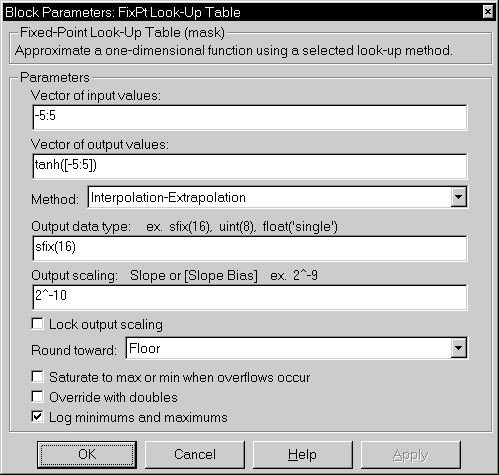
-
Vector of input values
-
The vector of input values must be the same size as the output vector and
strictly monotonically increasing.
-
Vector of output values
-
The vector of output values must be the same size as the input vector.
-
Method
-
Look-up method.
-
Output data type
-
Any data type supported by the Fixed-Point Blockset.
-
Output scaling
-
Radix point-only or slope/bias scaling. These scaling modes are only available
for generalized fixed-point data types.
-
Lock output scaling
-
If checked, Output scaling is locked. This feature is only available
for generalized fixed-point output.
-
Round toward
-
Rounding mode for the fixed-point output.
-
Saturate to max or min when overflows occur
-
If checked, fixed-point overflows saturate. Otherwise, they wrap.
-
Override with doubles
-
If checked, the Output data type is overridden with doubles.
-
Log minimums and maximums
-
If checked, minimum and maximum simulation values are logged to the workspace.
Conversions
The Vector of input values parameter is
converted from doubles to the input data type. The Vector of output
values parameter is converted from doubles to the output data type.
Both conversion are performed offline using round-to-nearest and saturation.
Refer to "Parameter Conversions" in the manual for more information about
parameter conversions.
Characteristics
| Input Port(s) |
Any data type supported by the blockset |
| Output Port |
Any data type supported by the blockset |
| Direct Feedthrough |
Yes |
| Sample Time |
Inherited |
| Scalar Expansion |
No |
| States |
0 |
| Vectorized |
Yes |
Example
This example illustrates the look-up methods supported
by the FixPt Look-Up Table block.Suppose you have
a vector of input values given by [-5:5] and a vector of output
values given by sinh([-5:5]). Using the model shown below,

these results were generated.
| Look-Up Method |
Input |
Output |
Comment |
Interpolation-Extrapolation
|
1.4 |
2.153 |
N/A |
| 5.2 |
83.59 |
N/A |
Interpolation-Use End Values
|
1.4 |
2.153 |
N/A |
| 5.2 |
74.2 |
The value for sinh(5.0) was used. |
| Use Input Nearest |
1.4 |
1.175 |
The value for sinh(1.0) was used. |
Use Input Below
|
1.4 |
1.175 |
The value for sinh(1.0) was used. |
| -5.2 |
-74.2 |
The value for sinh(-5.0) was used. |
Use Input Above
|
1.4 |
3.627 |
The value for sinh(2.0) was used. |
| 5.2 |
74.2 |
The value for sinh(5.0) was used. |
[ Previous | Help
Desk | Next ]