Read/write ELiS parameter vectors and/or ELiS parameter files.
Syntax
pvect = exppar(domain,num,denom)
pvect = exppar(domain,num,denom,delay,fs,...
      filename,comments,fdate)
[domain,num,denom,delay,fs] = imppar(pdat)
[domain,num,denom,delay,fs,comments,fdate] = imppar(pdat,fsc)
Description
exppar writes parameters of the transfer function to a vector in the workspace, and/or to parameter files (used by elis).
pvect is the vector containing the same data as the *.pnt file.
domain may be 's' or 'z', depending on the domain; num is the numerator vector, z-domain coefficients in ascending order of powers of z-1, or s-domain coefficients in descending order of powers of s. denom is the denominator vector, similarly to num. delay is the additional delay, fs is the sampling frequency in the z-domain, or the scaling frequency between the internal representation and the s-domain parameter vector or file, which is written in standard SI units.
The string variable filename is the name of the file. If the name has no extension, this function extends it by '.pnt'. If the extension is .pbn, the result will be a binary file, else an ASCII text file. If the extension is .pnt, no comment is sent to the ASCII file, only data.
The file will be created in the active subdirectory or folder. If a file is written or read, the most important values will be displayed on the screen, unless a global variable expimpmessages with value 'no' is defined. If filename is empty, no file will be written.
The parameters will be written to ASCII files in floating-point form by exppar, with 16-digit accuracy of the mantissas.
comments is a string with eventual comments (optional), and fdate is a date (and time) string (also optional). If fdate is missing or empty, an actual date string will be generated.
In an s-domain parameter vector or file, the saved fs value is the so-called suggested scaling frequency, usable in a later import. The algorithm uses a simple ad hoc formula to find a scaling frequency, which brings the roots of the numerator and denominator polynomials possibly close to 1:
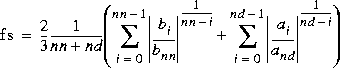 When the numerator or the denominator is degenerate, the corresponding term is set to 1; if the formula would still give an unusable result, like i
nf or NaN, fs is set to 1.
imppar reads parameters from parameter vectors or files (used by elis). The file may be an ASCII file with comments (usual extension: .par), a flat ASCII file without comments (.pnt) or a binary file (.pbn). The file has to be somewhere within the path of MATLAB, or the path is to be explicitly given. The default extension is .pnt.
As an output argument of imppar, fs is the sampling frequency in the z-domain, while in the s-domain it is the scaling frequency between the internal representation and the parameter vector or file which is written in standard SI units. pdat is the data vector or the name of the file; the data vector contains the data in the same order as a .pnt file.
The scaling frequency between the s-domain internal representation and the parameter file can be set by fsc. If fsc is not given, no scaling will be performed (fsc = 1), if it is empty (fsc = []), the previously saved value in the parameter vector or file is used. In the case of z-domain files, fsc is ignored.
Default Argument Values
delay = 0, fs = 1, fsc = 1
Examples
pvect = exppar('s',[1,1],[1,2,3,4]);
exppar('z',[1,1],[4,3,2,1],0,1,'filter.pnt',...
          'First trial',date);
[domain,num,denom,delay,fs] = imppar('filter.pnt');
[domain,num,denom,delay,fsc] = imppar('inpchans.pbn',[]);
Diagnostics
If a file already exists with the same name, exppar tries to delete it. This will be unsuccessful if the file is not in the active subdirectory/folder. In this case the error message is:
Cannot delete existing file ...
imppar checks the contents of the vector (file); if this is inconsistent, an error message is sent:
Not enough data in file ...
See Also
"Description of the Data Vector and File Formats" in the User's Guide
[ Previous | Help Desk | Next ]