Apply a gain specified in dB.
Library
Elementary Functions, in Math Functions
Description
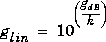
The dB Gain block multiplies the input by a specified constant, variable, or expression. The specified Gain value is converted from dB to a linear gain value before being applied to the input signal:
where glin is the linear gain value and gdB is the gain in decibels. The value k is set to 10 for power signals (select Power from the Input signal pop-up menu) and 20 for magnitude signals (select Amplitude from the Input signal pop-up menu).
The gain must be a real scalar, which you can enter as a numeric value, or as a variable or expression. The value of the equivalent linear gain is displayed below the dB gain value in the block icon.
Dialog Box
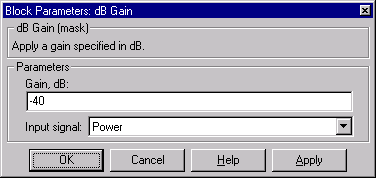
- Gain

- The gain to apply to the input, specified in dB.
- Input signal

- The type of input signal: Power or Amplitude.
See Also
dB
[ Previous | Help Desk | Next ]