| Data Acquisition Toolbox | Search Help Desk |
Engineering Unit Conversion
The Data Acquisition Toolbox provides you with a method for scaling output data such that it is not clipped when sent to the D/A converter. In most cases, data that represents specific engineering units (Pascals, Newtons, etc.) should be scaled. When data is output to a D/A converter, you must be aware of these two issues:| Property |
Description |
OutputRange
|
Range of D/A converter
|
Units
|
Engineering units name
|
UnitsRange
|
Scaling factor for data in MATLAB workspace
|
OutputRange property is expressed in terms of gain and polarity. If data is outside the OutputRange values, it is clipped to the values set for UnitsRange. An example using UnitsRange is given in the following example.
Example: Performing a Linear Conversion
Suppose you are outputting data to one analog output channel. The output data ranges between -2 and 2 volts and the D/A converter has a maximum range of -1 volt to 1 volt. If the data is not scaled, it will be clipped since its range exceeds that of the D/A hardware. To solve this problem, you must use theUnitsRange property. As shown in the figure below, setting UnitsRange to [-2 2] scales the output data such that a value of -2 maps to -1 at the hardware level and a value of 2 maps to 1 at the hardware level. 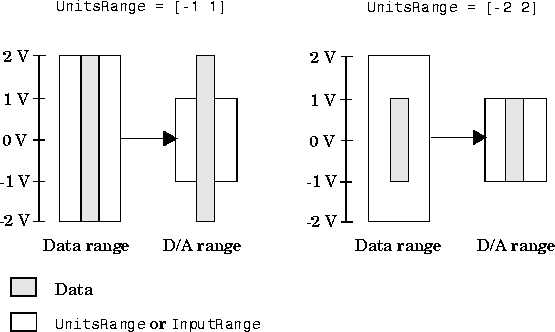
 Initialization: create the analog output object
 AO for a sound card. The available adaptors are found with daqhwinfo.
Configuration: Add one channel toAO = analogoutput('winsound');%AO = analogoutput('nidaq', 1);
AO, set the trigger to repeat two times, generate data to be queued, set the UnitsRange property, and queue the data with one call to putdata.
Termination: deletechan = addchannel(AO, 1);%chan = addchannel(AO, 0);set(AO, 'SampleRate', 8000);ActualRate = get(AO, 'SampleRate');set(AO, 'RepeatOutput', 2); data = 2*sin(0:(1/ActualRate):2*pi)'; set(chan, 'UnitsRange', [-2 2]); putdata(AO, data) Execution: StartAOand wait for the device object to stop running.
AO.
delete(AO)