| Data Acquisition Toolbox | Search Help Desk |
Using putdata
To output data to the D/A hardware, you must use theputdata function. The syntax for putdata is
putdata(obj, source)
obj is the analog output object.
source is the MATLAB variable containing the data to be output.
putdata outputs data specified by source to the D/A hardware. source is a MATLAB variable and must consist of a column of data for each channel group member. A data source for m samples and n channels is illustrated below.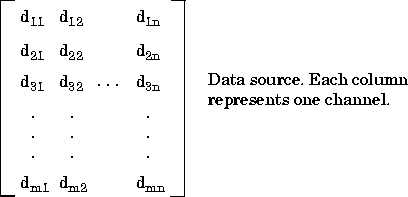
UnitsRange property, then the data is clipped to the maximum or minimum value specified by UnitsRange. An error is returned if a NaN is included in the data stream. The data contained by source can be the native data type of the hardware.
You can use putdata to queue data in memory either before or after the start command is issued. In either case, no data is output until the trigger executes.
If you call putdata before start is issued, then the specified data is queued in the engine unless:
MaxSamplesQueued is reached. If this value is exceeded, an error is returned.
RepeatOutput property. If RepeatOutput is greater than 0, then all data queued before start is issued will be requeued (repeated) the specified number of times. You can use multiple putdata calls to queue data.
Note:
RepeatOutput must be set before putdata is called and before start is called.
After the queued data is sent to the D/A hardware, the output process stops and data can once again be queued. While queued data is being output, a call to putdata results in an error.
If putdata is called after start is issued, then you cannot use RepeatOutput and the queue must initially be empty. If MaxSamplesQueued is exceeded, putdata becomes a blocking function until there is enough space in the engine to queue the additional data.
As soon as the trigger executes, the SamplesOutput property keeps a running count of the total number of samples per channel that have been output. Additionally, the SamplesAvailable property tells you how many samples are ready to be output from the engine per channel. When data is output, SamplesAvailable is reduced by the number of samples sent to the hardware.