| Data Acquisition Toolbox | Search Help Desk |
Outputting Data with a National Instruments Board
In this example, sine wave data is generated in MATLAB, output to the D/A converter on a National Instruments board, and displayed with an oscilloscope. The setup is shown below.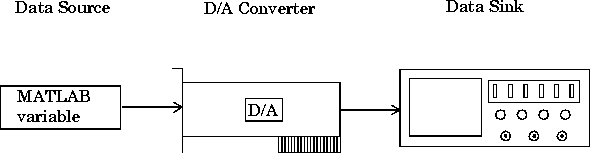
putdata calls, and a manual trigger is issued to initiate the output. The complete data acquisition session for the sound card is shown below.
 Initialization: Create the analog output object
 AO for a National Instruments board. The installed adaptors and hardware ID's are found with daqhwinfo.
AO = analogoutput('nidaq',1);
AO, define an output time of four seconds, assign values to the basic setup properties, generate data to be queued, and queue the data with one call to putdata.
Execution: Startchans = addchannel(AO, 0);duration = 4;set(AO, 'SampleRate', 10000);set(AO, 'TriggerType', 'Manual');set(AO.Channel(1), 'UnitsRange', [-2 2]); ActualRate = get(AO, 'SampleRate'); len = ActualRate*duration; data = 2*sin(linspace(0, 2*pi, len))'; putdata(AO, data);
AO, issue a manual trigger, and wait for the device object to stop running.
Termination: Deletestart(AO);trigger(AO);while strcmp(AO.Running, 'On') end
AO.
delete(AO)