
| Data Acquisition Toolbox | Search Help Desk |
Sampling Channels
Sampling channels can be one of the most important and complicated considerations for many data acquisition applications. Within the Data Acquisition Toolbox, sampling channels involves properties related to the sampling rate and the channel skew. These topics are discussed below.Sampling Rate
The sampling rate is given by theSampleRate property and is defined as the number of samples acquired per second from each channel group member. However, the maximum rate that channels can be sampled at depends on the type of hardware you are using.
If you are using simultaneous sample and hold (SSH) hardware such as a sound card, then the maximum sampling rate for each channel is given by the maximum board rate. For example, suppose you create the analog input object AI for a sound card, configure it for stereo operation, and set the sampling rate to 44,100 Hz.
AI = analoginput('winsound');
addchannel(AI, 1:2);
set(AI, 'SampleRate', 44100);
Both channels are sampled at 44,100 Hz.
If you are using scanning hardware, the maximum sampling rate your hardware is rated at typically applies for one channel. Therefore, the maximum sampling rate per channel is given by the formula
AI for a National Instruments device, and add 10 channels to it. If the device has a maximum rate of 100 kHz, then the maximum sampling rate per channel is 10 kHz.
AI = analoginput('nidaq',1);
set(AI, 'InputType', 'SingleEnded');
addchannel(AI, 0:9);
set(AI, 'SampleRate', 10000);
Typically, this maximum rate can be achieved only under ideal conditions. In practice, the sampling rate depends on many variables including the settling time, the gain, and the channel skew as well as the number of channels you acquire data from. Channel skew is discussed in the next section.
Note:
SampleRate value is changed, the BufferingConfig values are recalculated by the engine if BufferingMode is set to Auto.
Channel Skew
Channel skew is defined as the time (in seconds) between consecutive scanned channels in a channel group. The relationship between channel skew and sampling rate is illustrated below.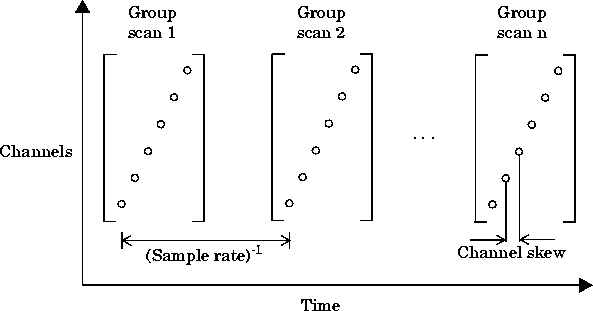
ChannelSkewMode property. The hardware-specific values for this property are shown below.ChannelSkewMode is set to Minimum or Equisample, then ChannelSkew contains the appropriate read-only value. If ChannelSkewMode is set to Manual, the channel skew is given by the ChannelSkew property.
ChannelSkew is settable only for scanning hardware and not for simultaneous sample and hold (SSH) hardware. For SSH hardware, ChannelSkewMode can only be None and the only valid ChannelSkew value is 0.