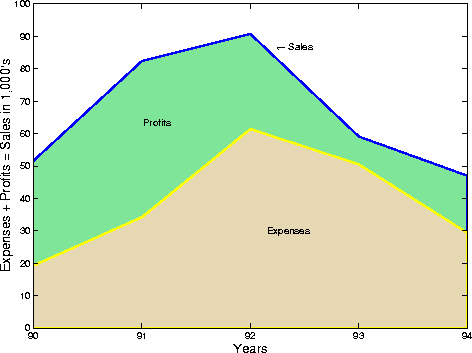
Comparing Datasets with Area Graphs
Area graphs are useful for comparing different datasets. For example, given a vector containing sales figures,
sales = [51.6 82.4 90.8 59.1 47.0];
for the five-year period
x = 90:94;
and a vector containing profits figures for the same five-year period
profits = [19.3 34.2 61.4 50.5 29.4];
display both as two separate area graphs within the same axes. Set the color of the area interior (FaceColor), its edges (EdgeColor), and the width of the edge lines (LineWidth). See patch for a complete list of properties.
area(x,sales,'FaceColor',[.5 .9 .6],...
             'EdgeColor','b',...
             'LineWidth',2)
hold on
area(x,profits,'FaceColor',[.9 .85 .7],...
               'EdgeColor','y',...
               'LineWidth',2)
hold off
To annotate the graph, use the statements
set(gca,'XTick',[90:94])
set(gca,'Layer','top')
gtext('\leftarrow Sales')
gtext('Profits')
gtext('Expenses')
xlabel('Years','FontSize',14)
ylabel('Expenses + Profits = Sales in 1,000''s','FontSize',14)
[ Previous | Help Desk | Next ]