UNIX
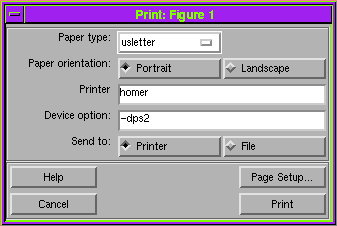
To print a figure, choose the Print option from the figure window's File menu. MATLAB brings up the print dialog box:
Fill in the dialog box, and then click the button in the lower right corner of the box. This button is labeled Print if Send to Printer is selected and Save if Send to File is selected. If you are saving to a file, MATLAB displays another dialog box where you specify the filename.
See "Graphic File Formats" for a list of options for the Device option field.
[ Previous | Help Desk | Next ]