Positioning the Figure on the Printed Page
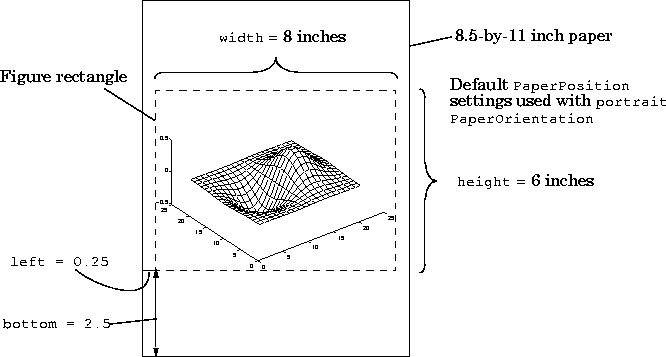
The PaperPosition property is a four-element row vector that specifies the dimensions and position of the printed output. The form of the vector is:
[distance_from_left distance_from_bottom width height]
Note that the window border is not included in the printed figure.
Resizing the Figure
By default, the value of PaperPosition does not change when you resize or reshape a figure. This means that the size of the printed output may not match the screen display. If you want the printed figure to match its size and shape on the screen, you can do one of the following:
set(gcf,'PaperPositionMode','auto')
In general, it is easiest to use the Page Setup dialog box to size and position the graphic on the printed page.
Automatic PaperPosition - WYSIWYG Printing
When PaperPositionMode is set to auto, the width and height of the printed figure are determined by the figure's dimensions on the screen, and the figure position is adjusted to center the figure on the page.
Note that when PaperPositionMode is auto, MATLAB sets the value of the PaperPosition property when you resize the figure. Therefore, if you change PaperPositionMode back to manual and then print the figure, the output will still be the same size as the figure is on screen, unless you also set PaperPosition to default.
If you want the default value of PaperPositionMode to be auto, enter this line in your startup.m file:
set(0,'DefaultFigurePaperPositionMode','auto')
Setting PaperPositionMode to auto is especially important if you want to print out figures that include uicontrols or images. If PaperPositionMode is manual, these objects are likely to be distorted when you print them.
Factory Default PaperPosition
The factory default PaperPosition,
[0.25 2.5 8.0 6.0]
is designed to print the figure on 8.5-by-11 inch paper in portrait orientation. It results in a printed figure that is about as large as can fit on the paper (with a one-quarter inch border on the left and right sides) and is centered on the paper. The width of eight inches and the height of six inches give an aspect ratio (ratio of width to height) that is the same as the default figure aspect ratio on the screen.
[ Previous | Help Desk | Next ]