| MATLAB Function Reference | Search Help Desk |
| plotedit | Examples See Also |
Start plot edit mode to allow editing and annotation of plots
Syntax
plotedit on
plotedit off
plotedit
plotedit(h)
plotedit(h,'state')
Description
plotedit on
plotedit off
plotedit
plotedit(h)
h.
plotedit(h,'state')
plotedit state for figure handle h. Values for state can be as shown.| Value for state |
Description |
on |
starts plot edit mode |
off |
ends plot edit mode |
showtoolsmenu |
displays the Tools menu in the menu bar |
hidetoolsmenu |
does not display the Tools menu in the menu bar |
hidetoolsmenu is intended for GUI developers who do not want the Tools menu to appear in applications that use the figure window.
Remarks
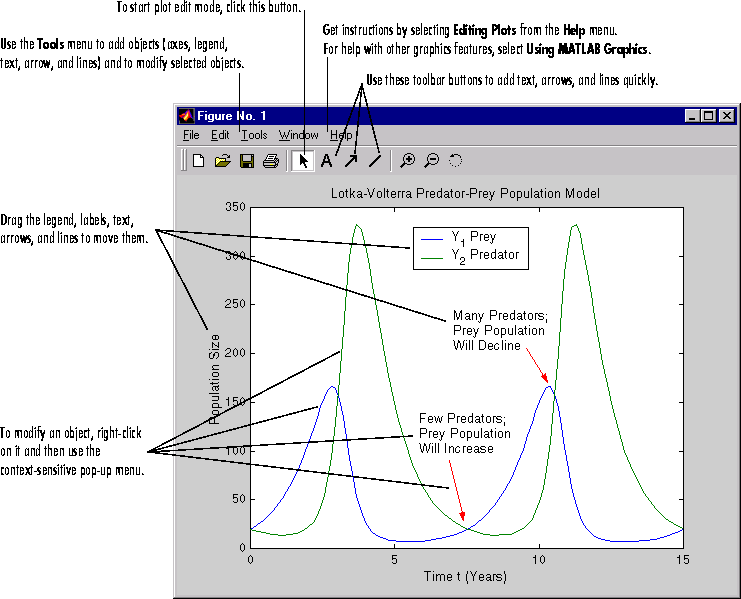
Main Features of the Plot Editor
Help
For more information about using the Plot Editor, select Editing Plots from the Plot Editor Help menu. For help with other graphics features, select Using MATLAB Graphics.Examples
Start plot edit mode for the current figure, if the mode is not currently on for that figure:plotedit
plotedit offEnd plot edit mode for the current figure if it is currently on for that figure:
ploteditStart plot edit mode for figure 2:
plotedit(2)End plot edit mode for figure 2:
plotedit(2, 'off')Hide the Tools menu for the current figure:
plotedit('hidetoolsmenu')
See Also
axes, line, open, plot, print, saveas, text