Create or alter options structure for input to ODE solvers
Syntax
options = odeset('name1',value1,'name2',value2,...)
options = odeset(oldopts,'name1',value1,...)
options = odeset(oldopts,newopts)
odeset
Description
The odeset function lets you adjust the integration parameters of the ODE solvers. See below for information about the integration parameters.
options = odeset('name1',value1,'name2',value2,...)
creates an integrator options structure in which the named properties have the specified values. The odeset function sets any unspecified properties to the empty matrix [].
It is sufficient to type only the leading characters that uniquely identify the property name. Case is ignored for property names.
options = odeset(oldopts,'name1',value1,...)
alters an existing options structure with the values supplied.
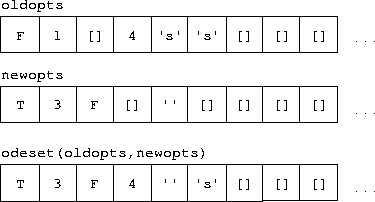
options = odeset(oldopts,newopts)
alters an existing options structure oldopts by combining it with a new options structure newopts. Any new options not equal to the empty matrix overwrite corresponding options in oldopts. For example:
odeset
by itself displays all property names and their possible values:
odeset
      AbsTol: [ positive scalar or vector {1e-6}]
      BDF: [ on | {off} ]
      Events: [ on | {off} ]
      InitialStep: [ positive scalar ]
      Jacobian: [ on | {off} ]
      JConstant: [ on | {off} ]
      JPattern: [ on | {off} ]
       Mass: [ {none} | M | M(t) | M(t,y) ]
       MassSingular: [ yes | no | {maybe} ]
      MaxOrder: [ 1 | 2 | 3 | 4 | {5} ]
       MaxStep: [ positive scalar ]
      OutputFcn: [ string ]
      OutputSel: [ vector of integers ]
      Refine: [ positive integer ]
      RelTol: [ positive scalar {1e-3} ]
      Stats: [ on | {off} ]
      Vectorized: [ on | {off} ]
Properties
The available properties depend on the ODE solver used. There are seven principal categories of properties:
Table 2-1: Error Tolerance Properties
Property
|
Value
|
Description
|
RelTol
|
Positive scalar {1e-3}
|
A relative error tolerance that applies to all components of the solution vector.
|
AbsTol
|
Positive scalar or vector {1e-6}
|
The absolute error tolerance. If scalar, the tolerance applies to all components of the solution vector. Otherwise the tolerances apply to corresponding components.
|
Table 2-2: Solver Output Properties
Property
|
Value
|
Description
|
OutputFcn
|
String
|
The name of an installable output function (for example, odeplot, odephas2, odephas3, and odeprint). The ODE solvers call outputfcn(TSPAN,Y0,'init') before beginning the integration, to initialize the output function. Subsequently, the solver calls status = outputfcn(T,Y) after computing each output point (T,Y). The status return value should be 1 if integration should be halted (e.g., a STOP button has been pressed) and 0 otherwise. When the integration is complete, the solver calls outputfcn([],[],'done').
|
OutputSel
|
Vector of indices
|
Specifies which components of the solution vector are to be passed to the output function.
|
Refine
|
Positive Integer
|
Produces smoother output, increasing the number of output points by a factor of n. In most solvers, the default value is 1. However, within ode45, Refine is 4 by default to compensate for the solver's large step sizes. To override this and see only the time steps chosen by ode45, set Refine to 1.
|
Stats
|
on | {off}
|
Specifies whether statistics about the computational cost of the integration should be displayed.
|
Table 2-3: Jacobian Matrix Properties (for ode15s and ode23s)
Property
|
Value
|
Description
|
Jacobian
|
on | {off}
|
Informs the solver that the ODE file responds to the arguments (t,y,'jacobian') by returning  (see (see odefile).
|
JConstant
|
on | {off}
|
Specifies whether the Jacobian matrix  is constant (see is constant (see b5ode).
|
JPattern
|
on | {off}
|
Informs the solver that the ODE file responds to the arguments ([],[],'jpattern') by returning a sparse matrix containing 1's showing the nonzeros of  (see (see brussode).
|
Vectorized
|
on | {off}
|
Informs the solver that the ODE file F(t,y) has been vectorized so that
F(t,[y1 y2 ...]) returns
[F(t,y1) F(t,y2) ...]. That is, your ODE file can pass to the solver a whole array of column vectors at once. Your ODE file will be called by a stiff solver in a vectorized manner only if generating Jacobians numerically (the default behavior) and odeset has been used to set Vectorized to 'on'.
|
Table 2-4: Event Location Property
Property
|
Value
|
Description
|
Events
|
on | {off}
|
Instructs the solver to locate events. The ODE file must respond to the arguments (t,y,'events') by returning the appropriate values. See odefile.
|
Table 2-5: Mass Matrix Properties (for ode15s and ode23s)
Property
|
Value
|
Description
|
Mass
|
{none} | M | M(t) | M(t,y)
|
Indicates whether the ODE file returns a mass matrix.
|
MassSingular
|
yes | no | {maybe}
|
Indicates whether the mass matrix is singular.
|
Table 2-6: Step Size Properties
Property
|
Value
|
Description
|
MaxStep
|
Positive scalar
|
An upper bound on the magnitude of the step size that the solver uses.
|
InitialStep
|
Positive scalar
|
Suggested initial step size. The solver tries this first, but if too large an error results, the solver uses a smaller step size.
|
In addition there are two options that apply only to the ode15s solver.
Table 2-7: ode15s Properties
Property
|
Value
|
Description
|
MaxOrder
|
1 | 2 | 3 | 4 | {5}
|
The maximum order formula used.
|
BDF
|
on | {off}
|
Specifies whether the backward differentiation formulas (BDFs) are to be used instead of the default numerical differentiation formulas (NDFs).
|
See Also
odefile, odeget, ode45, ode23, ode23t, ode23tb, ode113, ode15s,ode23s
[ Previous | Help Desk | Next ]