| MATLAB Function Reference | Search Help Desk |
| coneplot | Examples See Also |
Plot velocity vectors as cones in a 3-D vector field
Syntax
coneplot(X,Y,Z,U,V,W,Cx,Cy,Cz)
coneplot(U,V,W,Cx,Cy,Cz)
coneplot(...,s)
coneplot(...,'quiver')
coneplot(...,'method')
h = coneplot(...)
Description
coneplot(X,Y,Z,U,V,W,Cx,Cy,Cz) plots velocity vectors as cones pointing in the direction of the velocity vector and having a length proportional to the magnitude of the velocity vector.
X, Y, Z define the coordinates for the vector field.
U, V, W define the vector field. These arrays must be the same size, monotonic, and 3-D plaid (such as the data produced by meshgrid).
Cx, Cy, Cz define the location of the cones in vector field.
coneplot(U,V,W,Cx,Cy,Cz) (omitting the X, Y, and Z arguments) assumes [X,Y,Z] = meshgrid(1:n,1:m,1:p) where [m,n,p]= size(U).
coneplot(...,s) MATLAB automatically scales the cones to fit the graph and then stretches them by the scale factor s. If you do not specify a value for s, MATLAB uses a value of 1. Use s = 0 to plot the cones without automatic scaling.
coneplot(...,'quiver') draws arrows instead of cones (see quiver3 for an illustration of a quiver plot).
coneplot(...,'method') specifies the interpolation method to use. method can be: linear, cubic, nearest. linear is the default (see interp3 for a discussion of these interpolation methods)
h = coneplot(...) returns the handle to the patch object used to draw the cones. You can use the set command to change the properties of the cones.
Remarks
coneplot automatically scales the cones to fit the graph, while keeping them in proportion to the respective velocity vectors.
It is usually best to set the data aspect ratio of the axes before calling coneplot. You can set the ratio using the daspect command,
daspect([1,1,1])
Examples
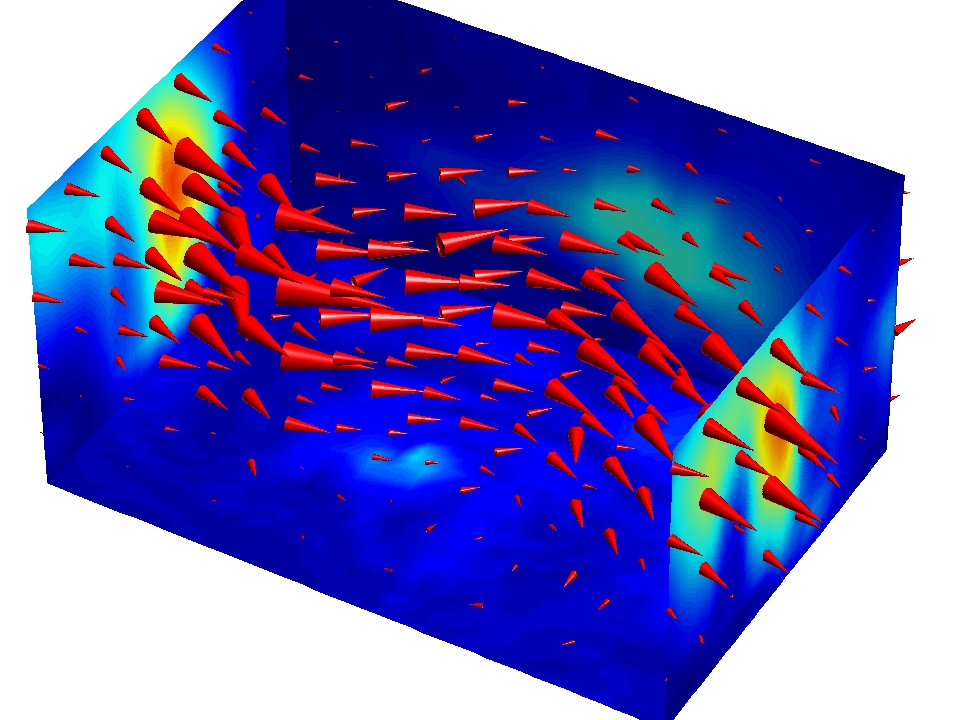
This example plots the velocity vector cones for vector volume data representing the motion of air through a rectangular region of space. The final graph employs a number of enhancements to visualize the data more effectively. These include:Load and Inspect Data
The winds data set contains six 3-D arrays:u, v, and w specify the vector components at each of the coordinate specified in x, y, and z. The coordinates define a lattice grid structure where the data is sampled within the volume.
It is useful to establish the range of the data to place the slice planes and to specify where you want the cone plots (min, max).
load wind
xmin = min(x(:));
xmax = max(x(:));
ymin = min(y(:));
ymax = max(y(:));
zmin = min(z(:));
Create the Cone Plot
linspace, meshgrid).
daspect to set the data aspect ratio of the axes before calling coneplot so MATLAB can determine the proper size of the cones.
FaceColor, EdgeColor).
daspect([2,2,1])
xrange = linspace(xmin,xmax,8);
yrange = linspace(ymin,ymax,8);
zrange = 3:4:15;
[cx cy cz] = meshgrid(xrange,yrange,zrange);
hcones = coneplot(x,y,z,u,v,w,cx,cy,cz,5);
set(hcones,'FaceColor','red','EdgeColor','none')
Add the Slice Planes
slice command.
xmin and xmax, along the y-axis at ymax, and along the z-axis at zmin.
hold, slice, FaceColor, EdgeColor).
hold on
wind_speed = sqrt(u.^2 + v.^2 + w.^2);
hsurfaces = slice(x,y,z,wind_speed,[xmin,xmax],ymax,zmin);
set(hsurfaces,'FaceColor','interp','EdgeColor','none')
hold off
Define the View
axis command to set the axis limits equal to the range of the data.
view to azimuth = 30 and elevation = 40 (rotate3d is a useful command for selecting the best view).
camproj).
camzoom).
axis tight; view(30,40); axis off camproj perspective; camzoom(1.5)The light source affects both the slice planes (surfaces) and the cone plots (patches). However, you can set the lighting characteristics of each independently.
camlight, lighting).
AmbientStrength property for each slice plane to improve the visibility of the dark blue colors. (Note that you can also specify a different colormap to change to coloring of the slice planes.)
DiffuseStrength property of the cones to brighten particularly those cones not showing specular reflections.
camlight right; lighting phong
set(hsurfaces,'AmbientStrength',.6)
set(hcones,'DiffuseStrength',.8)
See Also
isosurface, patch, reducevolume, smooth3, streamline, stream2, stream3, subvolume